Here is where you can find everything you need to know regarding the transition process to UNSW Sydney so that you can continue your academic journey with ease.
Academic English Students
UEEC Students
If you are a UEEC student, read our “Moving from UEEC to UNSW – What You Need To Know!” article on what to do after receiving your final results.
FEEC Students
If you passed your FEEC program, then you will transition to your intended Foundation Studies program. Please ensure you attend the Orientation for it.
|
|
|
|
|
|
|
|
Foundation Studies Students
What happens if you pass?
If you successfully pass your Foundation Studies program, the Assessments Team will send your results to UNSW Sydney.
- For international students, UNSW will issue the offer directly to you.
- For domestic students, please contact the Universities Admissions Centre (UAC).
What happens if you want to repeat?
The Enrolments Team manages repeat cases. They will review, identify eligible students, and send out the relevant communications to your email.
If you would like to enquire about repeating the program, please email [email protected]
What happens if you fail, and what are the other options?
- If your GPA is below 6, you will need to repeat Foundation Studies (either the whole program or Term 2).
- If your GPA is 6 or above, you may be eligible to progress to the Diploma (if you do not meet the requirements for your UNSW degree).
Diploma Students
Key Dates
| Event | Date |
| Last day to provide your USI in order to receive UNSW Sydney offer (for Pot Grads) | Monday 15 December 2025 |
| Results Release | Friday 19 December 2025 |
| UNSW Offers Issued to Students | Tuesday 23 December 2025 |
| For those taking supplementary exams | |
| Pot Grad Supp Exams | Monday 19 January 2026 |
| Results Release | Friday 30 January 2026 |
| UNSW Offers Issued to Students | Monday 2 February 2026 |
| UNSW Term Dates & Online Acceptances | |
| UNSW O Week | Monday 9 February 2026 |
| Accept Online Part I Close (Onshore Students) | Sunday 15 February 2026 |
| UNSW Term Starts | Monday 16 February 2026 |
| Accept Online Part II Close | Sunday 22 February 2026 |
| Graduation Ceremony | |
| Term 3 2025 Diploma Student Graduation Ceremony | Monday 23 March 2026 |
If you have successfully fulfilled all the necessary requirements to complete your Diploma program
- Submitting your USI
- Paying outstanding fees
- Resolution of any academic or non-academic misconduct cases
- Satisfactorily completing all required courses
then please expect an email to arrive from UNSW Sydney. Once you receive your offer, you can work on the next steps.
For College Diploma students:
Congratulations on completing your UNSW College Diploma! Your details have been forwarded to UNSW Admissions, who are currently processing progression to your second year of study. An offer will be issued to you once this process is complete. Please note that, due to high volumes of manual processing, this may take some time, and we appreciate your patience.
For UNSW Diploma students:
Your details have been forwarded to the UNSW Lifecycle Team, who will be processing your internal program transfer into your second year at UNSW. Please note that this processing will not commence until the week beginning Monday 5 January 2026, so we kindly ask for your patience during this time.
You should not enrol in Summer Term this year. From next year, you will be eligible to participate in Summer School.
Domestic and permanent resident students:
You will need to apply for your program via UAC. More information on this will be provided in January 2026.
Eligible domestic students can access Commonwealth Assistance, which are government schemes that help provide financial support. Read more about that here.
If you have passed the courses in your Diploma program but did not provide a verified USI
A Unique Student Identifier (USI) is required from Diploma students to be eligible to graduate and receive an offer from UNSW Sydney.
If you did not upload a verified USI to the Student Portal, you will not receive an offer in the first round. However, a second offer round will take place in late January 2026 and if you wish to commence your second year at UNSW Sydney, please ensure you provide and verify your USI via the Student Portal by Thursday 15 January 2026.
Students who have not provided a valid USI by this date will be unable to commence their studies at UNSW Sydney until the Term 2 (June 2026) intake. If you have any questions, please reach out to [email protected].
If you are a Business student who did not meet the required WAM
If you did not achieve an average mark of 60% or higher across all passed business courses, you are eligible for the following alternative pathways):
- Select a different Bachelor program at UNSW Sydney and receive credit recognition for some of your completed courses.
- Apply to either La Trobe University (Sydney) or Western Sydney University (WSU) for entry into the Bachelor of Business, with all 8 courses available for credit.
- Apply for entry to another university (see this flyer for further details).
We understand that not being able to progress to the UNSW Business School may be disappointing, and we encourage you to review the alternative options. If you would like to apply for UNSW Sydney (Bachelor of Arts-3409) please advise us no later than Thursday 15 January 2026 by email to [email protected].
Information about La Trobe University Sydney can be found in this flyer. La Trobe is ranked in the Top 1% of universities worldwide and has a conveniently located city campus in Sydney. They are also ranked in the Top 100 globally for quality education.
Western Sydney University (WSU) School of Business holds AACSB accreditation, an international recognition of excellence in business education. This accreditation reflects rigorous academic standards and a comprehensive external evaluation process. More information about WSU’s Business programs can be found at:
https://www.westernsydney.edu.au/future/study/courses
For general information about WSU, please visit:
https://www.westernsydney.edu.au
If you want to change your specialisation
We understand that sometimes classes may be full, you may need to take a course earlier in your degree, or you might even decide to change your specialisations or degree!
See this link for how UNSW can support you in your enrolment changes.
What happens if my Academic Standing is less than ‘Good’?
If you receive an Academic Standing of Risk Level 1, 2, 3 or 4, you may receive a letter from UNSW Sydney, and your letter will ask you to make an appointment with a Student Progress/Academic Support Adviser to discuss your future enrolment.
Please note that UNSW College will organise this appointment for you and email you the details next week. In the meantime, do not wait to enrol – you must enrol yourself into your courses and register for your classes by the end of Week 1, regardless of your Academic Standing.
If you have any questions regarding your Academic Standing or Progression, please email the Academic Progression Team.
Pre-Masters Students
If You Achieve And Meet Your UNSW Entry Requirement
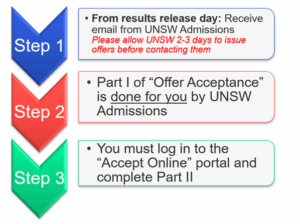
- How to enrol in UNSW courses
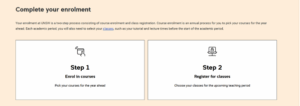
Do this as soon as you get your offer as classes fill up quickly – enrol here.
- Select “Enrol in Courses” (see screenshot below)
- Watch the video here
- Follow your Faculty Progression Plan and your personal offer letter
- If you have any questions regarding your offer, please submit an enquiry to UNSW Admissions.
If You Fail to Meet your UNSW Entry Requirements
If you fail any of your Pre-Masters courses, you are eligible to re-take the course. The process for failing to meet your UNSW Entry requirements is as follows:
- You will receive an email asking you if you would like to re-enrol in the failed course.
- You MUST respond to the email with your intention, whether you would like to re-enrol, withdraw or apply for program leave.
- If you choose to re-enrol, you will be added to the course and be prompted to build your timetable on Allocate+
You must complete the Pre-Masters program within 3 terms as per the Academic Progression and Exclusion Policy.
Key Dates You Should Know
| Your Next Steps | Deadline |
|---|---|
| Pre-Masters Program Results Release | Friday 19 December |
| Re-enrol in failed courses | From 19th December 2025, emails will be sent. You will have until Friday 23rd January to respond. |
| O-Week – do not miss this! | Monday 9th February – Friday 13th February |
| UNSW Term 1 Starts | Monday 16th February |
Retrieving your documents on myeQuals
If you’ve successfully completed the Pre-Masters program, you will receive your Completion Certificate, Statement of Results, and Grade Key via myeQuals. In most cases, this will appear within one week of your results being released. However, during public holidays or shutdown periods, processing may take longer.
An email notification will be sent to you once your document has been generated which will include a link to your My eQuals account.
If you are using My eQuals for the first time, you will need to register and then authenticate and activate your account by clicking on the link in the confirmation email you will receive after registration.
To learn more about how to use My eQuals, check out our article.
FAQs
FAQs
Q: I think my exam marks are not right, what should I do?
A: The marking of student exams is a very rigorous process. Each exam paper is marked by a group of teachers to ensure that your work and your resulting marks are checked more than once. However, if you still believe your exam marks have not been calculated properly, you may request a review of that calculation. Please note, in doing so your exam paper will not be re-marked. The calculations of your marks will be re-checked.
The application for a calculation check can be made within 10 calendar days of the results publication date. To make an application, you should use the ‘Calculation Check of Final Exam Marks Form’ located on the Current Students Website, under the Forms page.
Q: How do I know whether I meet the English requirement for my UNSW course?
A: Check your grades against your original offer letter, or you can refer to the English Language Requirements page.
Q: What if I do not meet the entry requirement?
A: You can either complete a recognised English Test (IELTS, Pearsons test) or change your UNSW program. You can also consider retaking your English program at UNSW College.
Q: I cannot log into the Student Portal / I cannot see the result on my Student Portal, what should I do?
A: Please contact our friendly IT Team to help by sending an email to [email protected].
Q: How do I get my official academic documents/transcripts?
A: Your academic documents, transcripts and credentials can be found on My eQuals. An email notification will be sent to you once your document has been generated which will include a link to your My eQuals account. If you are using My eQuals for the first time, you will need to register and then authenticate and activate your account by clicking on the link in the confirmation email you will receive after registration.
To learn more about how to use My eQuals, check out our article.
If you would like printed hard copies of your documents, you can send a ‘Request for Official Document Form’ located on the Current Student Hub website, under the Forms page to [email protected]. Please note that this service will incur a charge and that processing will take 3-8 weeks, depending on the delivery location.