
Week 1 Checklist

Give yourself the best start by reviewing this checklist to ensure you’re fully prepared for your academic journey.
-
Every student learns in their own way and we support students managing health conditions, mental health challenges, the effects of trauma, neurodivergence and disability to ensure equitable study experiences.
If a health condition, mental health difficulty, trauma-related impact or neurodivergence is affecting your studies, we are here to assist you.
If you require access to ELS, we recommend applying as soon as possible so our teaching staff can ensure support is ready in place to help reduce pressure, prevent issues from escalating and help you stay on track academically from the get-go.
If you experience any difficulties completing the form, or have any questions around this process, please email els@unswcollege.edu.au for assistance.
-
Make sure you are connected to eduroam, the Wi-Fi network for all current students. It provides secure internet access for laptops, tablets, and mobile phones.
You can connect through using your student email (z1234567@ad.unsw.edu.au) and password.
If you require assistance with internet connection, refer to this guide.
-
Knowing how to book an appointment with a Student Wellbeing or Progress Adviser is important because it helps you access support quickly and confidently when you need it.
Early support makes a difference: If you’re experiencing academic, personal or wellbeing challenges, speaking to an adviser early can prevent small issues from becoming bigger problems.
Timely academic guidance: A Progress Adviser can help you understand course requirements, improve study strategies and get back on track before assessment deadlines.
Wellbeing support: A Student Wellbeing Adviser can assist with stress, homesickness, mental health concerns or adjusting to life in a new environment.
Meeting visa or attendance requirements – If you’re an international student, seeking advice early can help you stay compliant with attendance and academic progression expectations.
Knowing your options: Advisers can explain available services, policies and next steps, so you can make informed decisions about your studies.
-
Your student ID card allows you access to a range of student services at UNSW. Additionally, you will need it to for student discounts and during examination period.
You can book an ID card appointment with The Nucleus here.
-
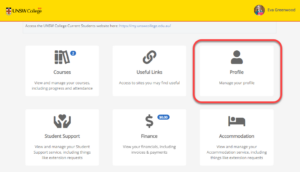
Go into your Student Portal profile and check that you have:
- Uploaded a photo of yourself (avoid avatars, animated graphics and inappropriate photos as doing so with be a breach of the the Student Code of Conduct).
- Updated your local Sydney address and Australian mobile phone number.
- At least one emergency contact.
-
The Unique Student Identifier (USI) is a government-issued, ten-digit ID that is free to create and provides an online account that contains a record of all study and training completed in Australia across multiple institutions. You must have a USI account as a student in Australia and is a requirement for domestic and onshore international students to graduate, receive an award and access Commonwealth Assistance (if eligible).
Once you have your USI ready, you must also upload it to and verify it in the Student Portal.
-
For all other students (Academic English, Foundation, Diploma & Pre-Masters):
Your online learning platform where you will find all your course information, class materials, assignment outlines, exam details and your teacher’s contact information.
Log in using your student email. When logging in, you will also receive a MFA notification on your smartphone that you must approve.
If you have any login problems please contact enquiries@unswcollege.edu.au and include your full name, zID, a description of the issue you are having with either Moodle or Canvas, and include screenshots where possible.
-
In your online learning platform, you must complete the "NSW Health Consent" and "Artificial Intelligence (AI)" modules. It is essential that you work through these modules as soon as possible, so that you are aware of consent, sexuality and sexual health, as well as how you can use AI correctly for study and assessments.
-
Did you know that UNSW College has our own student clubs (different to the ones from Arc) that are completely free to join?
Each club hosts regular activities for members to get involved and mingle with other students who share the same hobbies.
Read more about the student clubs here.
-
Understanding your timetable can be confusing at first, but once you know how to decode the location it's simple!
-
It's important that you get yourself enrolled into the correct subjects and allocated in classes as soon as possible.
Refer to your self-enrolment guide which will tell you what to enrol in during your first term. You will need to enrol in each of the individual courses you intend to study using the Subject Enrolment Form located on your Student Portal under “Useful Links”.
You can also view the resources below to assist you with your self-enrolment:
If you have any questions about your enrolment, please contact the relevant team, and include your zID and full name in the email:
- For Diploma enquiries: diplomaenquiry@unswcollege.edu.au
- For Pre-Masters enquiries: pre-mastersenquiry@unswcollege.edu.au
For Gateway Diploma students only:
You have already been enrolled in your first term course, either DPGE1001 Communication and Academic Literacy 1 or DPGE1004 Communication and Academic Literacy 4, depending on eligibility.
Communication and Academic Literacy 4 (DPGE1004) is an accelerated English course. This course encompasses the content of DPGE1001, DPGE1002, and DPGE1003; however, instead of completing these three courses separately over three terms, students who meet the requirements will be enrolled into DPGE1004 and complete it within a single term.
If you are a new student who has not logged into myUNSW previously, please follow these steps below:
You will need to have activated your zID, as part of the ‘Accept Online Part 2’ process.
- As a Diploma student, you will be given access to myUNSW.
- Select the sign-on option where you will need to enter your UNSW zID and password.
- You can follow the enrolment guide here.
Once you have logged into your myUNSW, please click on ‘Class timetable’ under the enrolments heading and you will be able to view your timetable. You can also click here if you need help deciphering your course codes and locations in your timetable.
If you have any questions about your enrolment, please contact the Diploma Enquiry Team at DiplomaEnquiry@unswcollege.edu.au
UNSW College delivers its Foundation Studies, Academic English, Diplomas, and Pre-Masters Program, under CRICOS Provider Code 01020K; TEQSA Provider ID: PRV13020 (Institute of Higher Education).
UNSW College delivers its Applied Degrees under TEQSA Provider ID: PRV13020 (Institute of Higher Education).
UNSW College also delivers UNSW Diplomas on behalf of UNSW Sydney under CRICOS Provider Code 00098G; UNSW Sydney TEQSA Provider ID: PRV12055 (Australian University).
See unswcollege.edu.au/esos for more information.
© 2026 UNSW Global Pty Limited.