
Student Guide to Marking Your Attendance
Use Allocate+ to check in, review and monitor your attendance

This guide explains the three ways to mark attendance in Allocate+ and how to review your attendance record during the term.
Before you begin
You can access Allocate+ through the Student Portal or by using the direct Allocate+ link.
Option A – Student Portal
- Log in to the Student Portal: portal.unswcollege.edu.au
- Select Useful Links.
- Select Allocate+ from the Web Links list.
Option B – Direct access
- Open Google Chrome or Microsoft Edge and go to timetables.unswcollege.edu.au/aplus-student
- Sign in using your student email (zID@ad.unsw.edu.au) and your password.
Important – attendance check-in
- Mark your attendance at the start of class.
- You can only mark attendance during the scheduled time of your class – not before it starts or after it ends.
- Only check in to the class you are actually attending.
- Make sure the Allocate+ time zone is set to Sydney and use your current timetable.
- Teachers verify attendance during class. False attendance may be treated as student misconduct and may result in disciplinary action.
- All lectures are part of attendance.
There are three ways to mark your attendance:
Method 1: Upcoming Events on the Dashboard
- Log in to your Allocate+ account.
- On the Dashboard page, locate the Upcoming Events section.
- Find your current class listed under Upcoming Events.
- Click the class to open the Activity Details box.
- Locate the ‘In this class?' question in the activity details.
- Click Yes or No to mark your attendance.

Choose the correct response
- Select Yes if you are in the class.
- Select No if you are not in the class.
Method 2: The Activity Card in Timetable Grid View
- Log in to your Allocate+ account.
- Click Timetable in the navigation bar.
- In the Grid View, locate the Activity Card for your current class.
- Click the activity card to open the Activity Details box.
- Locate the ‘In this class?’ question in the activity details.
- Click Yes or No to mark your attendance.

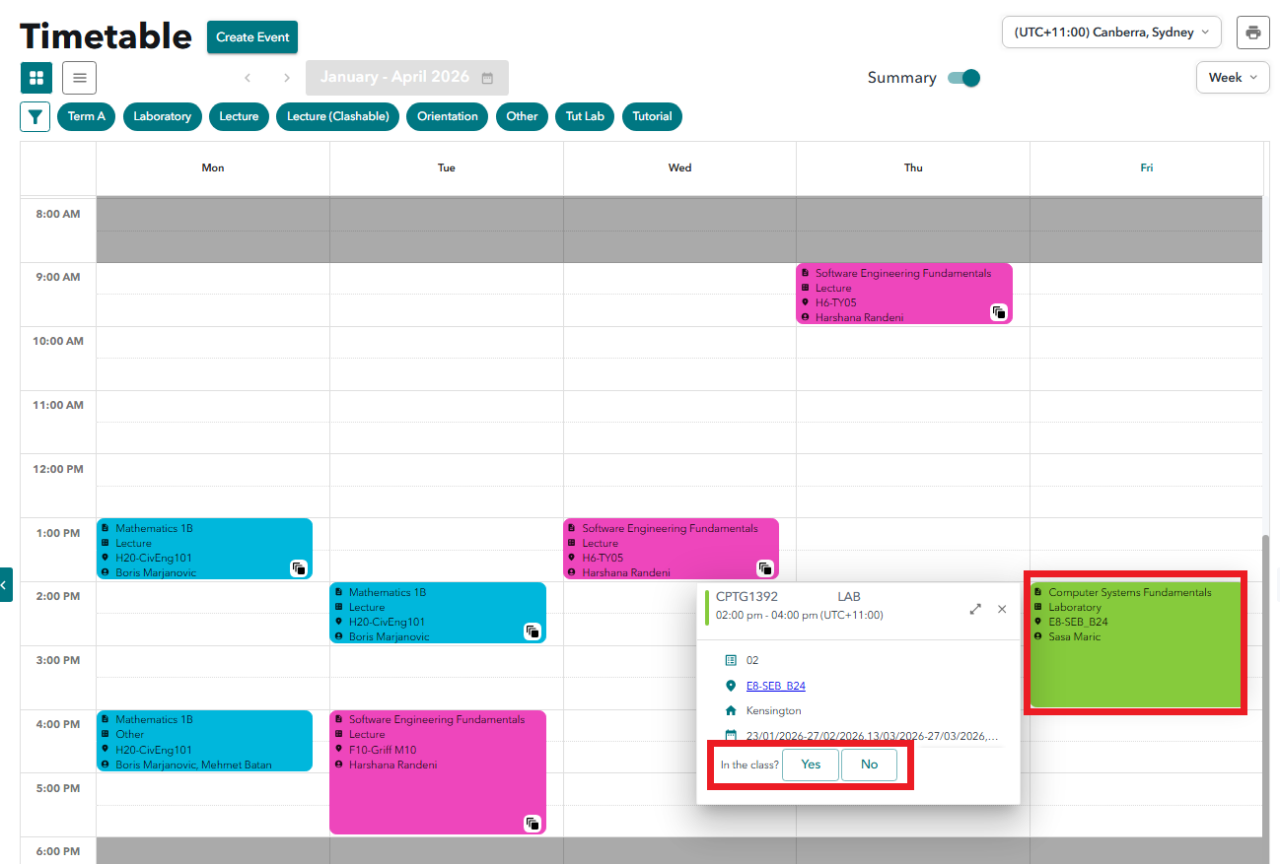
At the start of the class
- Check that the subject, activity type, day, time and location match the class you are attending.
- Do not check in to a different class, even if it is for the same subject.
Method 3: The Action Pane using View More
- Log in to your Allocate+ account.
- Click Timetable in the navigation bar.
- Locate the Action Pane on the right side of the page.
- Find your subject in the list of allocated subjects.
- Click View More on the subject card.
- Locate your class under the Current Class section.
- Find the ‘In this class?’ question beside the class details.
- Click Yes or No to mark your attendance.

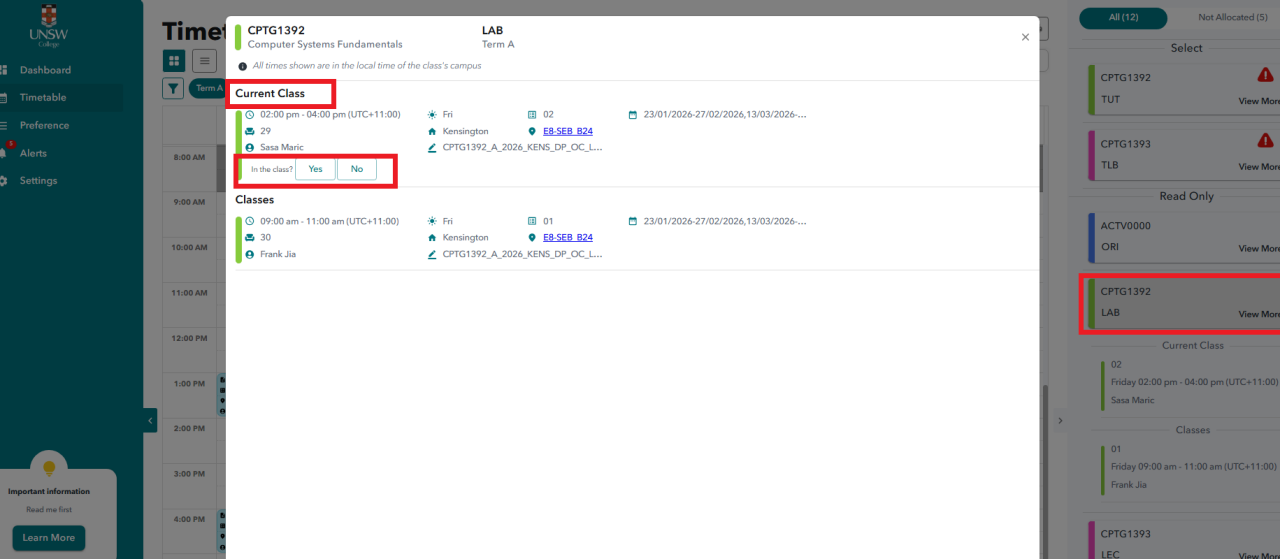
Attendance integrity
- Teachers verify attendance during class.
- Do not select Yes unless you are physically attending that class.
- False attendance may be treated as student misconduct and may result in disciplinary action.
View and monitor your attendance
- Select Attendance in the left-hand menu.
- Review your overall attendance percentage and totals during the term.
- Use the subject and activity breakdown to identify any Partial, Absent or Unmarked classes that may need checking.

Understand the attendance breakdown
Overall summary

Subject and activity breakdown

- Overall attendance percentage.
- Present, Partial, Absent and Unmarked totals.
- Attendance information for individual subjects and activity types.
- Details that can help you identify and report an attendance issue.
- A clearer view of your record where your program has attendance or participation requirements.
Key reminders and help
Public holiday reminder
- If your class is scheduled on an NSW public holiday, you do not need to attend the class.
- Check the UNSW College Key Dates page for the NSW public holiday schedule.
If your attendance record does not look correct
- Open the Attendance page and check the overall summary and subject/activity breakdown.
- Identify the subject, class date and attendance status that you believe needs checking.
- Use the information shown on the Attendance page when reporting the issue through your program's attendance enquiry process.
Related guidance
- Student Guide to Allocate+ – for help using the Allocate+ interface.
- Student Guide to Attendance – if you receive an Attendance Warning or a Notice of Intention to Report.
- UNSW College Key Dates – for public holidays and important program dates.
Remember
- Mark attendance at the start of every class.
- Only mark "Yes" when you are physically attending the scheduled class.
- Check your attendance record regularly rather than waiting until the end of term.
Related articles
UNSW College delivers its Foundation Studies, Academic English, Diplomas, and Pre-Masters Program, under CRICOS Provider Code 01020K; TEQSA Provider ID: PRV13020 (Institute of Higher Education).
UNSW College delivers its Applied Degrees under TEQSA Provider ID: PRV13020 (Institute of Higher Education).
UNSW College also delivers UNSW Diplomas on behalf of UNSW Sydney under CRICOS Provider Code 00098G; UNSW Sydney TEQSA Provider ID: PRV12055 (Australian University).
See unswcollege.edu.au/esos for more information.
© 2026 UNSW Global Pty Limited.